
- As a third grade teacher deeply invested in technology, as a contributing member of my district's technology committee, and as a student of technology integration, I already possessed a lot of background knowledge. I had been involved in developing technology plans and policies for almost nine years. I have also been piloting different technologies for my district, including a classroom Chromebook pilot this year. Though I already knew much about technology integration and how many aspects must align for successful integration, I still learned a lot that will guide me in my own practices.
- Analyzing the ISTE NETS for Administrators and Educators was extremely powerful. It was important to see how the standards are designed to create a progression, beginning with the administration and trickling down to the student level. When administrators have a clear vision and are invested in technology integration, teachers will be better positioned to achieve their ISTE NETS and ultimately promote student achievement. The vision to me seems key; administrators need to clearly communicate their vision for technology integration so that teachers can buy into it and play an active role in making that vision a reality. All stakeholders must be a part of the process. As a technology integration specialist, I feel that I could help create that bridge for communication.
- The vision is also important when considering professional development. What professional development is relevant and timely for the teachers? For supporting the students? Administration with clear goals can set timelines for certain benchmarks and plan appropriate professional development to meet their needs. As a technology integration specialist, I would work closely with administrators and teachers to build a reasonable timeline and professional development schedule to guide them as they work toward achieving their vision.
- Finally, why is it so important to continue to perfect the technology integration craft and develop professional development to support this?
- The ultimate goal of any classroom or school-wide endeavor should be to improve student learning and prepare students for life beyond school. This population of students is unique; they are digital natives. Students today have technology embedded into their daily lives (Shrum & Levin, 2009, p. 27) and they shouldn’t have to “power down” or feel demotivated when they come to school (Prensky, 2001, p. 3). Rather, we should be capitalizing on students’ interest and experience with technology. THIS is why technology integration is so important. We are creating learning opportunities for our students that didn't exist before, yet are authentic and relevant to today's learners. We need to stay abreast of new technological developments and teach our students to be 21st century learners and 21st century citizens. As the picture above states, technology use in school should be second nature. Therefore, we must continue to perfect the technology integration craft and support teachers through consistent, timely, and relevant professional development.
- References
- Prensky, M. (2001). Digital natives, digital immigrants. Retrieved September 12, 2014, from
Shrum, L. and Levin, B.B. (2009). Leading 21st Century Schools.
Thursday, February 25, 2016
Upon Reflection


Sunday, February 7, 2016
BYOD: The Good, The Bad, and The Ugly
 |
| Image Source: http://twinpossible.com/wp-content/uploads/2013/07/backfun.jpg |
Many schools recognize the value of a technology-rich learning environment. However, school budgets simply do not always allow for the purchase of sufficient technology for 1:1 computing. This leaves many schools in the proverbial stone age, essentially limiting our students learning potential. With "Bring Your Own Device" policies, students are permitted to bring smartphones, tablets, and laptops to school for instructional purposes. While at first glance this seems like the perfect solution to get technology into the hands of the students, there are several issues to consider.
The Good
- Technology in the hands of the students
- Students use technology that is comfortable and familiar to them.
- Not all students have access to personal devices.
- Lack of bandwidth and connectivity issues; Wi-Fi infrastructure must be sufficient to support many devices.
- Apps must work on a variety of devices.
- Lack of ability to print from personal devices
- Professional development is essential to successful BYOD implementation.
- Troubleshooting a variety of devices; inefficient use of class time
- Personal devices can be a distraction and/or disrupt learning.
- Free apps must be properly vetted to ensure that there are no inappropriate ads.
- Violation of BYOD policies
~~~~~~~~~~~~~~~~~~~~~~~~~~~~~~~~~~~~~~~~~~~~~~~~~
Overall, I am not swayed by the promises of BYOD. As I mentioned, with BYOD, students get to use technology that they are familiar with in the classroom. This sounds great, and perhaps with high school students this might work, but I foresee too many problems that outweigh the potential positives. What I envision is classroom chaos. I see some students not having devices at all. Do teachers partner them with someone who has a device? Does partnering them even work for all assignments? Do teachers have some school-owned devices for these students? Even if all students have a device, some devices are better than others, especially for certain activities. Can you imagine a student typing an entire 10-page paper on a smartphone?
Overall, I am not swayed by the promises of BYOD. As I mentioned, with BYOD, students get to use technology that they are familiar with in the classroom. This sounds great, and perhaps with high school students this might work, but I foresee too many problems that outweigh the potential positives. What I envision is classroom chaos. I see some students not having devices at all. Do teachers partner them with someone who has a device? Does partnering them even work for all assignments? Do teachers have some school-owned devices for these students? Even if all students have a device, some devices are better than others, especially for certain activities. Can you imagine a student typing an entire 10-page paper on a smartphone?
Once all students are outfitted with a device, the chaos continues. I now see teachers spending a majority of their time with students figuring out how to download apps, attempting to troubleshoot devices only to learn that a certain app doesn't work with that device, or figuring out why students are having trouble connecting to the network. I see connectivity issues occurring regularly because the network is overloaded with too many devices per student.
Because of these issues and disruptions, students lose focus and begin using their devices in the classroom for personal communication. Students begin to violate the acceptable use policies and lose access to the network or have their BYOD privilege revoked, meaning now more students do not have devices to complete the required assignments. This cycle continues until teachers ultimately begin reverting back to traditional classroom instruction.
While 1:1 computing is the ideal situation, BYOD is not, and in the long run, Chromebook carts, classroom clusters of computers, and computer labs seem to be the best classroom technology configurations. With proper teacher training on district-owned devices, and IT professionals to provide support for maintenance and troubleshooting, teachers and students will be much more successful with technology implementation.
References:
Finegal, D. (2012.) Is BYOD the Answer to our Problems or the Worst Idea Ever? Retrieved from Learning and Leading with Technology: http://www.learningandleadingdigital.com/learning_leading/201202?pg=7#pg7
Nagel, D. (2012). Banning Is Not the Answer' to Mobile and Social Tools in Schools. Retrieved from https://thejournal.com/Articles/2012/04/11/Banning-Is-Not-the-Answer-to-Mobile-and-Social-Tools-in-Schools.aspx?Page=3
Sunday, January 31, 2016
Technology and Bloom's Taxonomy
 |
| Img Source: http://digitallearningworld.com/wp-content/uploads/2012/02/bloomspyramid.png |

We are fortunate to live in a connected world with educators collaborating all over the world to build a technologically rich learning environment for our students. In addition to the taxonomy pyramid filled with digital applications for each level of higher order thinking, Allan Carrington built upon a pedagogy wheel that listed verbs and activities related to each level of Bloom's taxonomy by adding digital applications for each level. The applications listed were largely influenced by Kathy Shrock's Bloomin' Apps Guide. Kathy Shrock continues to update her list by encouraging other educators to share resources with her through her website. There is also a collaborative effort in the form of a Google Sheet, originally created by moderators of a Twitter chat, that lists several digital tools that align with Bloom's taxonomy. And these are just a sampling of the many resources that are available for educators looking to boost their students' higher order thinking skills with the help of technology.
So what models allow us to support our students development of higher order thinking through the use of technology? In the next section of this post, I will guide you through some classroom technology scenarios that might be familiar as you consider activities for your own students. You can also look at a Budget Matrix that I developed that discusses the pros/cons of different technology setups, including cost considerations.
The One Computer Classroom
The one computer classroom is, unfortunately, the "norm" in classrooms, mostly due to financial limitations of school districts. While this is not the ideal scenario for individualizing instruction, students can still take advantage of technological learning with this setup. With a projector: 1) teachers and students can make presentations, 2) students can Skype or do a Google Hangout with an expert or connect with classrooms across the globe, 3) as a class or team they can create quizzes on Kahoot! for teams or other classes to complete, 4) students can take turns and post individually to a shared Padlet board, and 5) as a class students can do shared writing projects. With a document camera, students can share individual solutions to math problems and critique and help revise each other's writing. Another teacher, Stephanie Erickson (personal communication, SNHU Discussion Board, January 2016), also recommended a creative solution of building a shared cluster of computers by combining classroom computers of a team of teachers on a rolling cart or table.
The Small Computer Cluster Classroom
Some classrooms are lucky to have a cluster of computers in the classroom. For example, I have 6 Chromebooks in my classroom. My students work on a rotating schedule using different websites to target their individual learning needs. A cluster of computers can also be appropriate when students need to collaborate on a project. For these types of projects, the instructions should include different components that require students to spend time both on and off the computers. Finally, students can work in teams to respond to questions on platforms like Socrative in a friendly, competitive environment.
The Chromebook Cart (1:1 Computing)
Short of 1:1 computing school-wide, a Chromebook cart is the ideal classroom technology configuration. Because they are cheaper, they are more easily acquired and a district can purchase several Chromebook carts for the price of a single computer lab. However, these remain a shared resource so scheduling could be problematic depending on the popularity of these devices among teachers and the number of carts. Furthermore, Chromebooks use web-based applications, so if the network is malfunctioning, the Chromebooks become inoperative.
Bringing the devices into the classroom saves time and allows students to work individually on projects. Students can also collaborate on assignments even though they are on separate machines. For example, students can work on a writing assignment on Google Docs and provide comments to each other as they work. Students could also complete research projects together and gather information, including images and videos, on a shared Padlet board. With Chromebook management software and individual logins, students are held accountable for their time on the devices as well.
The Computer Lab (1:1 Computing)
Though somewhat similar to a Chromebook cart insofar as students can complete the same type of work and projects with this configuration, there are some issues with this setup. First of all, it is extremely costly so there is likely only one or two complete computer labs per school, which severely limits the ability to schedule ample time for a class to work. Secondly, moving an entire class of students to the lab takes away some of the time that could be used for learning and working. On the other hand, iMacs are much more powerful than Chromebooks. iMacs can have software directly installed on them. iMacs can also function without an Internet connection, so even if the network is down, students could still complete some assignments.
BYOD (Bring Your Own Device)
BYOD (Bring Your Own Device) is becoming a popular trend in schools. However, in my opinion, this is the least functional classroom technology configuration. I will delve deeper into the issues surrounding BYOD in my next post, but for now, I will touch upon a few issues with this setup. First of all, not all students will have devices. Secondly, working with a variety of devices means that teachers will have to know which applications work and don't work on the different devices. Downloading applications to several devices at once might monopolize significant bandwidth or be a very slow process, taking up valuable learning time. Furthermore, when something goes wrong on a device, the teacher or IT person might not know how to troubleshoot it. Even if everything works perfectly, teachers must be very cognizant of the applications they are asking the students to use to ensure that there are no inappropriate ads posted. Finally, ensuring that students stay on task might be more difficult with personal devices.
Aside from these potential issues, BYOD can allow students to access technology to enrich their learning. Students who don't have devices can potentially share with other students. With careful preplanning, students can download the applications prior to class. Professional development surrounding BYOD and mobile applications can help support teachers using this model. Finally, good policies about appropriate usage can help to hold students accountable.
~~~~~~~~~~~~~~~~~~~~~~~~~~~~~~~~~~~~~~~~~~~~~~~~~~~~~~~~~~~~~~~~~~~~~
References
Carrington, A. (n.d.) The Padagogy Wheel V 4.1. Retrieved from http://www.unity.net.au/padwheel/padwheelposter.pdf
Foreham, M. (n.d.). Bloom's Taxonomy. Retrieved from http://epltt.coe.uga.edu/index.php?title=Bloom%27s_Taxonomy
Ronan, A. (2015). 5 Tech Tool Combos for Taking Your Class Global. Retrieved from http://www.edudemic.com/5-tool-combinations-for-globalizing-class/
Shrock, K. (2015). Bloomin' Apps. Retrieved from http://www.schrockguide.net/bloomin-apps.html
Sunday, January 24, 2016
Tools for Data Analysis

Students and their achievement are at the center of everything teachers do. Assessment data is extremely valuable in being effective educators. Teachers can use both formal and informal assessment data in order to examine student performance. Using web 2.0 tools such as Google Sheets or Zoho, teachers can organize and analyze student data in order to individualize learning and develop new learning targets for their students. By sorting the data, teachers can make decisions about instructional groupings and teaching methods based upon common student performance.
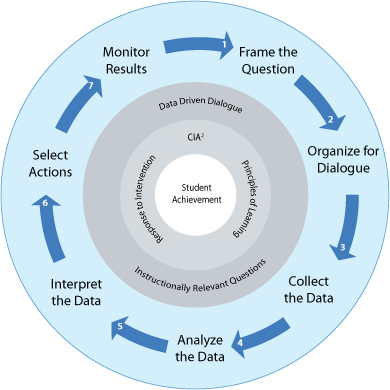 |
Once the data was entered into the spreadsheet, I color-coded it using conditional formatting to designate correct vs. incorrect answers. With this information, I was able to identify how many students met the tested standard for each question. This allowed the teacher, not only to see which students needed certain skills and concepts revisited, and which students were struggling to master the concepts overall, but also to reflect upon their teaching practices and inform future instruction, especially when a large percentage of the students failed to master a particular standard. Furthermore, beyond this single test, the teacher now has a foundation for including other measures of student performance and recording more data to analyze student growth.
In looking at the sample class data, there were about three questions in which more than half the class did not meet the standard. These concepts should be retaught in a whole class setting with purposeful scaffolding of the skills and concepts. During some class activities surrounding these standards, noting which students demonstrated a solid grasp of the standard and which students struggled could help with pairing students together to provide additional in-class support.
I decided to also sort the student data by overall percentage correct to help identify which students need the most intensive support. This bottom tier has the most gaps to fill; there are potentially foundational gaps that impede the students' ability to master the current grade level standards. Therefore, the teacher should administer other assessments for these students to pinpoint the areas of greatest need. At the same time, stronger students can be enriched; they can delve deeper into the standards they understand through projects involving higher-order thinking skills.
Using Google Sheets, this data can be shared with colleagues and administrators to observe trends and collaborate to make decisions about possible next steps for instruction. Teachers can use classroom performance and assessments as indicators of student growth, as well as include standardized assessment data. For example, my school uses NWEA Measures of Academic Progress test three times a year to track student progress. I use Google Docs to analyze my students' performance in the various strands as well as document their progress toward their spring score goal. I create instructional skill groups based on the data and ensure that my students are getting the interventions that they need.
Overall, data is not something that teachers should shy away from. Rather, it is something that should be considered and analyzed daily, and shared in a collaborative environment, in order to improve teaching practices and become more effective practitioners.
Open Data Assessment Sheet in Google Sheets
References:
Logan, L. (2015). 5 Ways to Use Data to Improve Your Teaching. Retrieved from http://www.amplify.com/viewpoints/5-ways-to-use-data-to-improve-your-teaching
Img Source: http://www.dallasisd.org/cms/lib/TX01001475/Centricity/Domain/5173/Data-Analysis-Model_Complete_v5.gif
Sunday, January 17, 2016
Sunday, January 10, 2016
Professional Development Survey
This form was created to support teachers in my district with training that is relevant for them.
Saturday, January 9, 2016
TPACK
 |
| Image Source: https://lborukedtech.files.wordpress.com/2013/02/tpack2.jpg |
 |
| Image Source: http://www.cheatography.com/uploads/davidpol_1443324020_tpack_1_0.png |
- Technological Knowledge ~ the knowledge and mastery of technological tools and devices
- Pedagogical Knowledge ~ the knowledge and practice of teaching, including researched-based best practices
- Content Knowledge ~ the knowledge of the content and standards that students must achieve
Here is a brief introduction to TPACK by Common Sense Media:
TPACK is extremely relevant for teachers today. If teachers want to implement the TPACK model into their classrooms, it is important for them to remember that they are experts and that they have the deepest understanding of pedagogy and content; teachers in general are not masterful users of technology. If they disregard their pedagogical and content knowledge when implementing technology, teachers will be less effective. Teachers must keep in mind the standards and learning goals.
Teachers have typically been known to plan "technocentrically" (as cited in Papert, 1987), meaning they first select a digital tool and then plan their lessons. However, teachers will build their TPACK knowledge more naturally if they use their pedagogical and content knowledge to plan a lesson and then add appropriate technology enhancements (Haris & Hofer, 2009). Teachers should always plan with the end in mind and choose learning goals and appropriate activities before they select digital tools and resources to support the learning experience. With this purposeful planning, technology becomes an learning tool that aligns with the learning goals, rather than the focus of the lesson.
The biggest obstacle for achieving TPACK is developing teachers' technological knowledge. Professional development remains a crucial element of TPACK. In order for teachers to utilize technological knowledge in their lesson planning, they must first acquire it. School districts and administrators must dedicate time to cultivating a community of technologically proficient educators. Once teachers have a solid foundation of technological knowledge using some universal/core tools, they can begin to connect technology to education. Charts with activities for TPACK development, such as the one compiled by Haris and Hofer (2009), support teachers as they build their TPACK. The TPACK website also has several useful resources. The activities listed are wide-ranging and can be used across the curriculum. Students can use blogs to critique a students' math process or debate politics and discuss the meaning of poetry. Students can use movie-making software to create presentations or make digital storybooks. Technology can be used to create learning opportunities or to demonstrate learning. Furthermore, combining the different types of activities can change learning that occurs. Using the TPACK model makes learning relevant and effective for our students.
Anderson, M. (2013, May 28). Technological Pedagogical Content Knowledge. Retrieved from http://ictevangelist.com/technological-pedagogical-and-content-knowledge/
Haris, J. & Hofer, M. (2009). Instructional Planning Activity Types as Vehicles for Curriculum-Based TPACK Development. Retrieved from http://activitytypes.wmwikis.net/file/view/HarrisHofer-TPACKActivityTypes.pdf
Koehler, M., & Mishru, P. (2008). Introducing TPCK. In M. Koehler, & P. Mishru, Handbook of Technological Pedalogical Content Knowledge (TPCK) for Educators (pp. 3-29). Routledge. Retrieved from http://punya.educ.msu.edu/publications/koehler_mishra_08.pdf
Sunday, December 20, 2015
Hats of the Technology Integration Specialist
The video clip featuring French and Saunders, though comedic, serves as the introduction for this blog post. For some teachers, that scenario is sadly reminiscent of what they experience when they are asked to or attempt to integrate technology without proper training. We know that in general, professional development is key for effective instruction and implementing best practices in the classroom. While educational best practices shift over time, professional development regarding technology integration is especially significant. It's important to remember that not all teachers are native technology users, and even if they are, technology is constantly evolving and new technology is constantly emerging. Teachers need to stay abreast of these changes in order to ensure that technology implemented is relevant and effective for the students.
Teachers should be comfortable using the technology that they implement. One study examined the difference between the discourse of digital native teachers and digital immigrant teachers and their students. The terms digital native and digital immigrant, coined by Marc Prensky (2001), refer to those who were born into the digital world and those who were not, respectively. The data analysis from the study indicated that digital native teacher possessed the skills to support her students, whereas the digital immigrant teacher lacked them. The digital immigration teacher demonstrated “hesitation, repetition, avoidance, divergence, and negation” because of her lack of technological competence (Grigoryan & Babayan, 2015). This is an indication of a broader problem between digital native students and digital immigrant teachers who do not speak the same language. While the study didn't delve into possible remedies for this discourse gap, professional development could certainly help to bridge the gap.
Technology should enhance and enrich our students' learning experiences; it should have strong curricular ties and its integration should be seamless. This ideal can only become reality through proper training and support. A technology integration specialist wears many hats in this regard. A technology integrator is a teacher, coach, mentor, and advocate. They need to have the experience in the classroom to understand the curriculum and the students as well as the experience with technology to support the teachers. They need to advocate for time and resources so that technology is available and accessible. They need to work closely with the administration to make sure that teachers and student have the tools that they need to make technology integration effective.
While a technology integration specialist is key in many ways in bringing technology to the forefront of education, professional development probably remains the biggest aspect of the job. A technology integration specialist should "provide consistent, frequent training and opportunities to practice new skills" (Don Macintosh, personal communication, September 27, 2014). A typical problem with professional development is that teachers are showered with new ideas in a single workshop and then left on their own to figure out how to use them. One idea to remedy this is to for the technology integrator to host weekly workshop hours in a computer lab to give teachers time to collaborate and try new things with built-in support. Technology integrators also need to be available to work with students and teachers in the classroom by modeling lessons and providing an extra hand during projects involving digital tools. With these strategies for professional development in place, teachers will begin to think of technology as a natural part of their pedagogy and lesson planning, rather than an additional burden or afterthought. Technology integration is much more effective when teachers consider "technology in education as part of the pedagogical process" (Okojie, Olinzock, & Okojie-Boulder, 2015).
While a technology integration specialist is key in many ways in bringing technology to the forefront of education, professional development probably remains the biggest aspect of the job. A technology integration specialist should "provide consistent, frequent training and opportunities to practice new skills" (Don Macintosh, personal communication, September 27, 2014). A typical problem with professional development is that teachers are showered with new ideas in a single workshop and then left on their own to figure out how to use them. One idea to remedy this is to for the technology integrator to host weekly workshop hours in a computer lab to give teachers time to collaborate and try new things with built-in support. Technology integrators also need to be available to work with students and teachers in the classroom by modeling lessons and providing an extra hand during projects involving digital tools. With these strategies for professional development in place, teachers will begin to think of technology as a natural part of their pedagogy and lesson planning, rather than an additional burden or afterthought. Technology integration is much more effective when teachers consider "technology in education as part of the pedagogical process" (Okojie, Olinzock, & Okojie-Boulder, 2015).
References
Grigoryan, T. & Babayan, N. (2015). Digital Natives and Digital Immigrants in a Paperless
Classroom. International Journal of Arts & Sciences, 8(1), 289-296.
Okojie, M., Olinzock, A., & Okojie-Boulder, T. (2015). The Pedagogy of Technology Integration.
The Journal of Technology Studies.
Prensky, M. (2001). Digital natives, digital immigrants. Retrieved September 12, 2014,
from http://www.marcprensky.com/writing/
from http://www.marcprensky.com/writing/
Saturday, July 25, 2015
GAFE New Hampshire Summit 2015

When I registered for the Google Summit, I was certainly excited to learn about how to implement Google Apps for Education in my classroom and support my colleagues with additional technology integration. What I didn't know was that I would get all that and much, MUCH more.
For two days I was part of a network, a team, of educators with a common goal. For two days, I was immersed in a stimulating learning environment centered around how to use Google's seamlessly integrated applications to support student learning.
On the first day I was inspired and totally pumped up by Jennifer Scheffer's key note speech where she encouraged us to not take baby steps [with technology], but to take a plunge and try BIG things! I haven't quite decided what my big thing will be this year, but I know it'll involve Google Apps for sure!

I then attended sessions led by the experts, such as Allison Mollica, an extremely knowledgable and energetic GAFE Leader who introduced me to her Treasure Trove of Greatest Hits with add-ons such as Tab Cloud, a list app called Google Keep, Gmail Labs, which allow the user to customize Gmail, and Google Docs research feature, to name a few. The quick tips and tricks that she interjected throughout the presentation were just as helpful as the planned presentation!
My brain was full after learning about the add-on Flubaroo, an automated system that can be used with Google Sheets to grade quizzes and tests created with Google Forms, and learning different ways to use Google Sites and Google Play to tailor instruction for all levels of student learning.
 We ended the day with a "Demo Slam" where each presenter got 2 minutes to share a cool site, tip, or trick that we could use. We learned some cool Google omnibox tips and tricks such as how to create two letter shortcuts for frequently used sites and the site http://www.makeuseof.com/ for more quick tips. Products like Air Parrot and Reflector were also introduced, that allow devices to be mirrored. (I even WON a free license for Reflector and can't wait to test it out once the school year starts.)
The second day was launched with the same energy and enthusiasm as the first. Ben Rouse opened his keynote presentation by posing the question, "Is Change the Only Constant?" With technology ever-evolving, this seems to be the truth of our classroom experience. Teachers need to keep up with the changes to support students; teachers need to understand how to use technology to enrich and enhance student learning. However, this does not mean simply replacing teachers with technology, because, as Arthur C. Clark said, "any teacher that can be replaced by a machine should be." Teachers need to remain facilitators of meaningful and authentic learning experiences.

The rest of the day was spent learning about "A Day in the Life of a Google Classroom" with Allison Mollica and then learning about Google Tour Builder, which, though still in Beta, is one of my absolute favorite new apps! It allows the user to build virtual tours that include images, videos, and written descriptions. This program has many great educational uses. For example, the second grade class in my school district used to go on a walking tour to learn about community helpers. They visited the police station, library, and the fire station to name a few. Though this trip was discontinued, the students now still have the opportunity to virtually visit all of these places! Furthermore, students can create their own virtual tours based on places they are studying, explore places in literature, and more!
Overall, this was the best two days of hands-on learning and collaboration that I have ever experienced. All teachers and leaders present had a common goal and I left the conference with new ideas, tools, and most importantly, an expanded network of colleagues!
#giesummit @jlscheffer @amollica +BenRouse
Friday, June 26, 2015
Embedding Digital Texts
 |
| Image Source: https://farm9.staticflickr.com/8491/8331776794_b48dc84cde_n.jpg |
 |
| Image Source: https://cmleinfofeed.files.wordpress.com/2015/04/ss2.png |
Massive Open Online Courses (MOOCs) were developed to give students affordable opportunities for higher education. While many top universities, such as MIT, offer MOOCs, there is still some question about the overall effectiveness of this learning platform. However, it has been gaining ground in the education field, with educators heavily participating and creating a much needed educational "renaissance" (Newton, 2015). This approach to professional development has gained so much interest, that Arthur Levine, a former president of Columbia University’s Teachers College, started a joint Woodrow Wilson/MIT teaching lab to further advance this movement (Newton, 2015). By changing the way teachers learn, we might change the way teachers teach.
In the classroom, digital texts have a powerful presence. Though the technology may be cost prohibitive, ultimately they may reduce costs to schools because of projects like Flat World, CK-12, and Project Gutenberg, that seek to provide access to textbooks and literature for students. Furthermore, digital texts and ebooks offer advantages that print books do not. Digital textbooks and sources are constantly being revised, as opposed to textbooks which may have outdated information. Furthermore, digital books are more interactive with the ability to highlight, annotate, and may even have hyperlinks to related sources. Digital texts are also often adaptive and lend themselves to assistive technologies. There are great resources, such as Bookshare, an online library for students with print disabilities. Finally, there is an initiative known as Beyond Textbooks, that enables educators to collaborate and share digital resources that go beyond traditional texts (Lewin, 2009).
Digital texts, e-learning, and open course software are breaking down the walls of the classroom and paving the way for 21st century learning, in school and beyond.
References:
Blow, M. (2012). Using Digital Books in the Classroom. Retrieved from http://www.scholastic.com/teachers/top-teaching/2012/04/using-digital-books-classroom
Lewin, T. (2009). In a Digital Classroom, Textbooks are History. Retrieved from http://www.nytimes.com/2009/08/09/education/09textbook.html?pagewanted=all&_r=0
MIT Open Courseware. (n.d.) Retrieved from http://ocw.mit.edu/index.htm
MOOC List. (n.d.). Retrieved from https://www.mooc-list.com/
Newton, D. (2015). The (Accidental) Power of MOOCs. Retrieved from http://www.theatlantic.com/education/archive/2015/06/the-secret-power-of-moocs/396608/
Sunday, June 21, 2015
Building Media Literacy
 |
| Image Source: http://mrswelshsclassroom.weebly.com/uploads/2/1/2/2/21227080/6770359_orig.jpg |
The definition of literacy is evolving. Throughout the ages, the meaning of literacy has shifted from being able to simply sign one’s name to reciting information to handwriting literacy and analytical literacy (Beers, 2015). Now, in the 21st century, literacy has evolved once more to include being able to "access, analyze, evaluate, and create" different types of media (What is Media Literacy, n.d.). Educators must prepare students to be successful in the 21st century; we must teach media literacy.
Teaching media literacy begins with teaching students digital citizenship. They must learn to navigate the Internet safely and responsibly. Resources like NetSmartzKids and Common Sense Media can support teachers as they take this first step in teaching media literacy.
 |
| Image Source: http://www.prn.bc.ca/ss/k5DL/wp-content/uploads/2013/11/I-am-a-digital-citizen-poster.png |
Furthermore, because anyone can post anything online, students need to be able to evaluate the sources of information for quality and integrity. Wikipedia and blogs are often considered reliable sources for research by students; however, students should be aware that anyone can publish anything on the Internet (What’s Wrong with Wikipedia, 2015). Therefore, students should be guided so they are able to distinguish scholarly articles and published sources from potentially inaccurate sources.
 |
| Image Source: http://blog.reyjunco.com/wp-content/uploads/2012/11/PILResearchIG.png |
Teaching media literacy helps students develop critical thinking skills and global awareness; students understand the global impact of media and how biases and misconceptions are perpetuated through media. By teaching students media literacy, students can then begin to create media and contribute positively to the 21st century global community.
Here is a video that summarizes media literacy:
References:
Beers, Kylene. “It’s Not the Rigor Conference Presentation.” NERA. Springfield, MA. 30 May 2015. Keynote Address.
CyberWise. (2011). "What Is Media Literacy" [Video]. Retrieved from https://www.youtube.com/watch?v=lKlJOxwyMWU
CyberWise. (2011). "What Is Media Literacy" [Video]. Retrieved from https://www.youtube.com/watch?v=lKlJOxwyMWU
What is Media Literacy? (n.d.). Retrieved from http://medialiteracyproject.org/learn/media-literacy
What’s Wrong with Wikipedia? (2015). Harvard Guide to Using Sources. Retrieved from http://isites.harvard.edu/icb/icb.do?keyword=k70847&pageid=icb.page346376
Blair, N. (2012) Technology Integration for the New 21st Century Learner. Retrieved from http://www.naesp.org/
Sunday, June 14, 2015
Web 2.0 Tools
 |
| Image Source: https://magicineducation.files.wordpress.com/2011/11/final-pic.jpg |
Web 2.0 tools are continuously developed and ever-evolving and can make a tremendous difference in student learning. Technology, as we know, has the potential to enhance and enrich education. Assignments incorporating technology should have strong ties to the curriculum, and more and more available Web 2.0 tools allow more authentic and appropriate integration.
Xtramath.Org
Math fact fluency is a major curriculum goal for my students. I utilize xtramath.org to personalize student practice. Parents, students, and teachers can view progress and tailor future instruction. Students are engaged and strive to perform well using this web program. The website also tracks performance and focuses practice on the facts that students haven’t mastered. It advances students once they’ve mastered a math operation. While not as flashy as some other math games on the Internet, it is a free, quality site that competes with paid math sites, such as IXL.
Socrative
Another web 2.0 tool that I use in my classroom is Socrative, a smart student response system that allows teachers to engage students with a series of educational exercises and games. It’s free, works on any device with Internet access, and can be completely tailored to teacher’s and student’s needs. Teachers can create quizzes or download and customize pre-written quizzes. Teachers can also spontaneously ask questions and get student responses or have students record exit tickets after a lesson. It is a very powerful formative assessment tool.
Wordle
 |
| Image Source: http://media.appappeal.com/cloud/web-2.0-tag-cloud-4.png |
Wordle is a word cloud generator that can be used to highlight key words and phrases or summarize the main ideas of a topic or concept. We have used it for vocabulary lessons frequently in my classroom and are currently using it as a collaborative effort to focus on similarities and differences between our Spanish pen pals and us. There is a slideshow that lists 45 Interesting Ways to Use Wordle in the Classroom. Since Wordle was developed, there have been additional word cloud generators have been created to compete with this application. Tagxedo and ImageChef, for example, allow the user to customize the shape and orientation of the word clouds. Here are some more word cloud generator options for your classroom!
Animoto
Animoto is an easy to use, video-editing web tool. It provides many educational opportunities for students. Teachers can create short, free videos to introduce a new topic and hook students into it or students could produce video presentations to demonstrate learning towards the end of a unit.
Here is a sample video I made with Animoto to introduce a unit on immigration:
There are lots of Web 2.0 tools out there with even more each day. The best way to stay on top of the current trends is to actively explore and develop a strong professional learning network, which I discussed in my previous post. Get out on the web and then bring it back to the classroom!
References:
Dunn, J. (2010). 45 Interesting Ways to Use Wordle in the Classroom. Retrieved from http://www.edudemic.com/45-interesting-ways-to-use-wordle-in-the-classroom/
Education Corner. (2015). XtraMath.org Review. Retrieved from http://www.educationcorner.com/xtramath.html
Rudey, D. (2013). Socrative - A 21st Century Way to Assess. Retrieved from http://www.emergingedtech.com/2013/08/socrative-a-21st-century-way-to-assess-as-easy-as-raising-your-hand/
Smitty, K. (2013). 9 Word Cloud Generators that Aren't Wordle. Retrieved from http://www.edudemic.com/9-word-cloud-generators-that-arent-wordle/
Saturday, June 6, 2015
Evaluating Technological Tools
Social media is important for schools that are committed to professional development. Staying connected with other educators, administrators, and experts allows teachers to transform their approach in the classroom (Burt, 2014). Building a personal learning network through Twitter, blogs, and other sites allows educators to collaborate and share resources and ideas easily. While professional networks for educators are important, there are some valuable technological tools that help to create learning networks for both teachers and students.
Twitter
 |
| Image Source: http://dailygenius.com/wp-content/uploads/2014/08/twitter-in-education.png |
Twitter is a valuable networking tool for teachers and students. Use of these tools can support children as they build research skills. Students are constantly connected and have instant access to real-time news and information (Osborne, 2012). For example, posting a simple tweet can spark a conversation with a real audience with different perspectives (Davison, 2015). On a global scale, students are able to "share information...and contribute their own thoughts" in an authentic way (Pandolfo, 2012).
Teachers is a platform for educators to share out information about resources, classroom ideas, and current research in education. Building my personal learning network through the blogs, wikis, and social media, primarily Twitter, has really helped me develop technical competencies with these tools as well as transform my approach to technology in the classroom (Burt, 2014). Twitter has become extremely valuable as I have discovered new learning tools to utilize in my classroom and have read articles that have challenged my thinking.
Below is a video outlining ways to incorporate Twitter in education:
Diigo
Diigo is a powerful tool that helps students and teachers create digital learning networks. With an account, users can bookmark and tag web pages. It also allows users to highlight and annotate parts of a webpage. In addition to being a useful individual research tool because these can be accessed from any computer, these bookmarks and notes can be shared in specific groups or with the entire Diigo community.
 |
| Image Source: http://www.passyworld.com/passyImagesFive/diigoIcons520x322JPG.jpg |
This can support student learning in a number of ways. Students can perform research on a topic and save annotated resources to a social group. Students working on similar projects can collaborate through Diigo as well.
Diigo also provides professional development opportunities. Teachers can share articles about current trends and best practices in education.
Google for Education
 |
| Image Source: http://dailygenius.com/wp-content/uploads/2014/12/google-apps-education-wallpaper.jpg |
The use of Google Apps is exploding in schools districts across the country. Even entire states are adopting it into their schools. The benefits are widespread both within and beyond the school walls. Upon first glance, a primary benefit is convenience; teachers and students have the ability to keep all of their documents and resources in a centralized location (Bright Hub, 2012). The fact that it is free is also appealing, but most importantly, it is engaging for students, as well as "interactive and...encourages collaboration" (Bright Hub, 2012). For example, students from around the world can work together to communicate and develop word documents and presentations.
While the Google Apps Suite is impressive, Google has also shown its dedication to promoting collaboration among educators through Google for Education. It has a Google+ page for a global network, as well as an option to search for a local Google+ page for educators. They even have created global digital conferences, launching Education on Air this past May. This was a wide-scale meeting of the minds for teachers across the world.
Virtual Learning Community
 |
| Image Source: http://images.ischoolguide.com/data/images/full/2086/everyday-mathematics.jpg?w=600 |
The Virtual Learning Community is a resource for educators using Everyday Mathematics. It is a space created and maintained by the Center for Elementary Mathematics and Science Education at the University of Chicago. Teachers post videos of model lessons and printable resources. There are discussion posts as well. It is a community dedicated to improving mathematical teaching practices.
Click here to watch a video and to learn more about Everyday Mathematics Virtual Learning Community.
References
The Best 6 Diigo Groups for Teachers to Join. (n.d.). Retrieved from http://www.educatorstechnology.com/2012/06/best-6-diigo-groups-for-teachers-to.html
Bright Hub Education Writer. (2012). A Guide to Google Apps for Education. Retrieved from http://www.brighthubeducation.com/teaching-methods-tips/96575-a-guide-to-google-apps-for-education/
Burt, R. (2014). What is a PLN? Edublogs Teacher Challenges. Retrieved from http://teacherchallenge.edublogs.org/pln-challenge-1-what-the-heck-is-a-pln/
Davison, S. (2015, March 4). Social media inside, outside of the classroom. Retrieved from http://smartblogs.com/education/2015/03/04/social-media-inside-outside-of-the- classroom/?utm_source=brief
Pandolfo, N. (2012). Social Media and Video Games in Classrooms Can Yield Valuable Data for Teachers. The Hechinger Report. Retrieved from http://www.huffingtonpost.com/2012/04/30/social-media-and-video-ga_n_1465082.html
Using Diigo in the Classroom (n.d.). Retrieved from https://sites.google.com/site/team8project9440/using-diigo-in-the-classroom-2
Subscribe to:
Posts (Atom)